
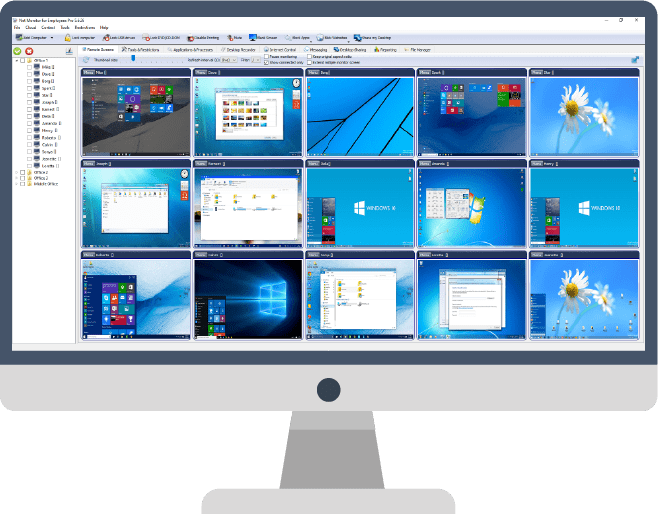
Guide to Employee Monitoring Software
Why Many Companies Use Employee Monitoring Software
In today's highly competitive business landscape, companies constantly seek ways to improve productivity and ensure efficient workflow. One effective solution that has gained popularity among employers is the use of employee monitoring software. While some may perceive it as a lack of trust in their workforce, the reality is that implementing monitoring measures can offer numerous benefits to businesses and their teams.
By deploying employee monitoring software, companies gain valuable insights into their employees' activities, enabling them to make data-driven decisions and drive business growth. Here, we will explore how computer monitoring and surveillance tools can help organizations thrive in the modern workplace.
One of the primary challenges faced by employers is ensuring that employees are utilizing their work hours effectively. Without adequate monitoring mechanisms, it becomes difficult to determine the actual time employees spend on work-related tasks and their overall productivity levels. Shockingly, studies have revealed that a significant portion of work time, sometimes up to 50%, is not utilized efficiently. Even a conservative estimate of 30% represents a substantial loss in potential productivity that demands proactive measures to address.
Fortunately, the advent of sophisticated technology solutions has provided managers and team leaders with a powerful ally in the form of employee monitoring software. These tools enable employers to monitor various aspects of their team's activities, providing real-time insights into their performance and time management. By leveraging comprehensive applications, managers can track emails, messages, internet usage, and application activity, among other crucial metrics. This holistic approach to monitoring ensures a comprehensive overview of employee behavior, facilitating effective decision-making and productivity improvement initiatives.
An excellent employee monitoring software should offer a wide range of features to meet the diverse needs of businesses. In addition to tracking digital activities, it should capture screenshots, record computer screens, log activity data, generate comprehensive reports, and even allow the blocking of particular applications and websites. These features provide managers and team leaders with a complete toolkit to ensure employee accountability, identify areas for improvement, and ultimately enhance overall business productivity.
By leveraging the capabilities of employee monitoring software, managers and team leaders can streamline operations, identify bottlenecks, and optimize resource allocation. Real-time data and comprehensive reports empower decision-makers with actionable insights to facilitate targeted interventions and foster a more productive work environment.
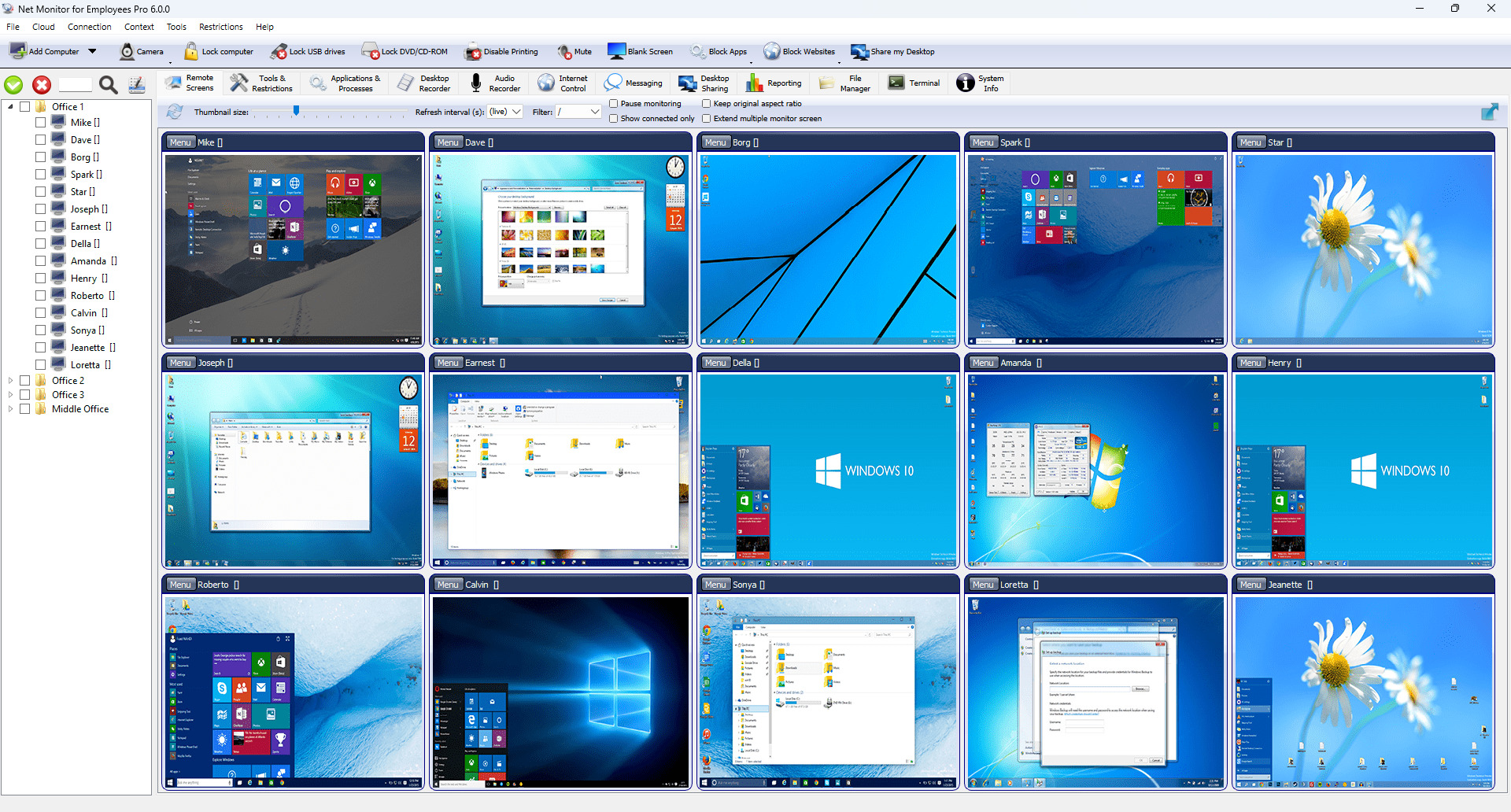 This screenshot shows how a manager does real-time monitoring of company computers.
You can make a free download of this tool here.
How Employee Monitoring Software Can Help Improve Productivity
In today's dynamic business landscape, the success of any organization hinges upon the collective efforts and productivity of its team members. As an employer, it is crucial to not only track the activities of your workforce but also provide them with the necessary support and guidance to enhance their productivity levels.
When implemented correctly and respectfully, employee monitoring can be a valuable tool in optimizing team performance and maximizing productivity. By closely observing worker activities on a daily basis, you gain valuable insights that allow you to make informed decisions and steer your team toward reaching their full potential.
The ultimate goal of any company is to ensure that all employees perform their tasks as efficiently and productively as possible. To achieve this, employers need a reliable means of objectively measuring team and individual performance. Employee monitoring software provides a powerful solution by capturing data, facts, and results, enabling employers to accurately assess and analyze performance metrics.
Performance tracking not only benefits employers but also creates a fair and transparent environment for employees. With access to concrete evidence of their work hours and accomplishments, employees can confidently demonstrate their dedication and contribution to the organization. This eliminates concerns about being unfairly compensated or unjustly dismissed and fosters a sense of trust and job security.
Furthermore, employee monitoring software can help identify high-performing individuals within the company. Employers can optimize resource allocation and foster an environment that nurtures professional growth and development by recognizing and utilizing their talents effectively.
Conversely, the data obtained through monitoring can also highlight areas where team members may be underperforming. With this information, employers can provide targeted support, training, and resources to help these individuals overcome challenges and improve their results. This proactive approach not only benefits the employee but also contributes to the overall success of the team and the organization as a whole.
The advantages of implementing employee monitoring software extend beyond individual performance assessments. It enables employers to identify patterns, trends, and bottlenecks in workflows, allowing for streamlined operations and efficient resource management. By leveraging the insights gained from monitoring, organizations can make data-driven decisions, implement process improvements, and drive continuous productivity enhancements.
To following few sentences will help you understand why such surveillance is beneficial.
No Time-Wasting - Employees Focus on Their Tasks
We live in a digital age, where the internet and social media have become integral parts of our daily lives. While these tools can serve business-related purposes, they can also be a significant source of time wastage for employees. Excessive internet surfing, social media browsing, and engaging in non-work-related activities can harm productivity, leading to a loss of valuable working hours.
Companies need to implement robust employee monitoring measures to address this challenge. By doing so, employers can identify and mitigate time-wasting behaviors, ensuring employees remain focused on their tasks and responsibilities.
It is disheartening to realize that many organizations lose a substantial amount of working hours due to employees engaging in unnecessary activities while on the job. From watching videos on company computers to playing games, browsing the internet, and indulging in idle gossip, these distractions can severely hamper productivity.
Real-time monitoring solutions offer a powerful means of combatting these productivity-draining behaviors. By capturing live screenshots of all computer screens within the workplace, employers gain real-time visibility into employee activities. Additionally, these monitoring tools allow employers to block non-work-related applications and websites, further discouraging distractions and reinforcing the importance of task-focused behavior.
Through comprehensive monitoring, employers can track various activities such as login and logout times, idle versus active computer usage, and other metrics that reveal whether employees are making the most of their working hours. This valuable data empowers employers to identify potential time-wasting habits, allowing for targeted interventions and corrective actions.
Communicating openly with your workforce would be best to optimize employee focus and minimize time wastage. Transparently informing employees about the presence of computer monitoring software on company computers encourages a culture of accountability and reinforces the expectation of task-oriented behavior.
It is also beneficial to engage in discussions with employees regarding social media use during work hours and the level of personal use that the company tolerates. By setting clear expectations and boundaries, employees are likelier to focus on their tasks without succumbing to time-wasting activities. These small yet impactful actions contribute significantly to overall team productivity.
By embracing employee and computer monitoring, companies can effectively combat time wastage and cultivate a work environment prioritizing productivity and performance. Proactive monitoring measures, open communication, and clear expectations ensure that employees remain engaged in their work responsibilities and minimize distractions.
Ultimately, businesses can unlock their full potential, drive efficiency, and achieve their strategic objectives in today's competitive landscape by optimizing employee focus and minimizing time wastage.
Reduce Distractions at Work
Creating a conducive and focused work environment is vital for employees to perform at their best. Distractions in the workplace can significantly hinder productivity and prevent individuals from reaching their full potential. Whether it's loud conversations, games, funny videos, or excessive social media usage, these distractions can harm employee performance.
Thankfully, implementing effective employee monitoring and computer monitoring solutions can significantly reduce distractions in the workplace. By leveraging such applications, employers can gain valuable insights into employee activities, identify sources of distraction, and take necessary measures to address them.
With employee monitoring software, distractions at work can be significantly minimized. By monitoring employee activities, employers can pinpoint individuals who are causing disruptions or those who are frequently distracted by games or other non-work-related activities. This knowledge empowers employers to take appropriate actions, such as providing guidance, training, or implementing policies to mitigate distractions effectively.
Moreover, advanced monitoring applications can precisely identify and block specific distractions. Employers can selectively block individual web pages or applications that are known to be significant sources of distraction. Employers create an environment that encourages focus and productivity by restricting access to these time-wasting elements.
It is a well-established fact that when employees are aware of being monitored, their behavior improves significantly. The knowledge that a computer monitoring application is actively surveilling their activities motivates employees to be more conscientious about their actions. Knowing that distractions are being tracked and monitored, employees are less likely to engage in disruptive behaviors or spend excessive time on social media platforms. This leads to a workplace environment where the team is dedicated to work alone, resulting in a substantial increase in overall productivity.
By reducing distractions through employee and computer monitoring, companies can encourage a work environment prioritizing focus, efficiency, and productivity. As distractions are minimized, employees can dedicate their energy and attention to their tasks, enabling them to perform at their highest level. The result is improved individual and team performance, leading to the achievement of organizational goals.
Implementing employee and computer monitoring solutions offers a powerful means to reduce distractions in the workplace. By identifying and addressing sources of distraction, blocking time-wasting websites and applications, and instilling a sense of accountability, businesses can create an environment conducive to productivity and success. Embracing monitoring technologies as part of a comprehensive productivity strategy enables organizations to unlock their full potential and thrive in today's competitive landscape.
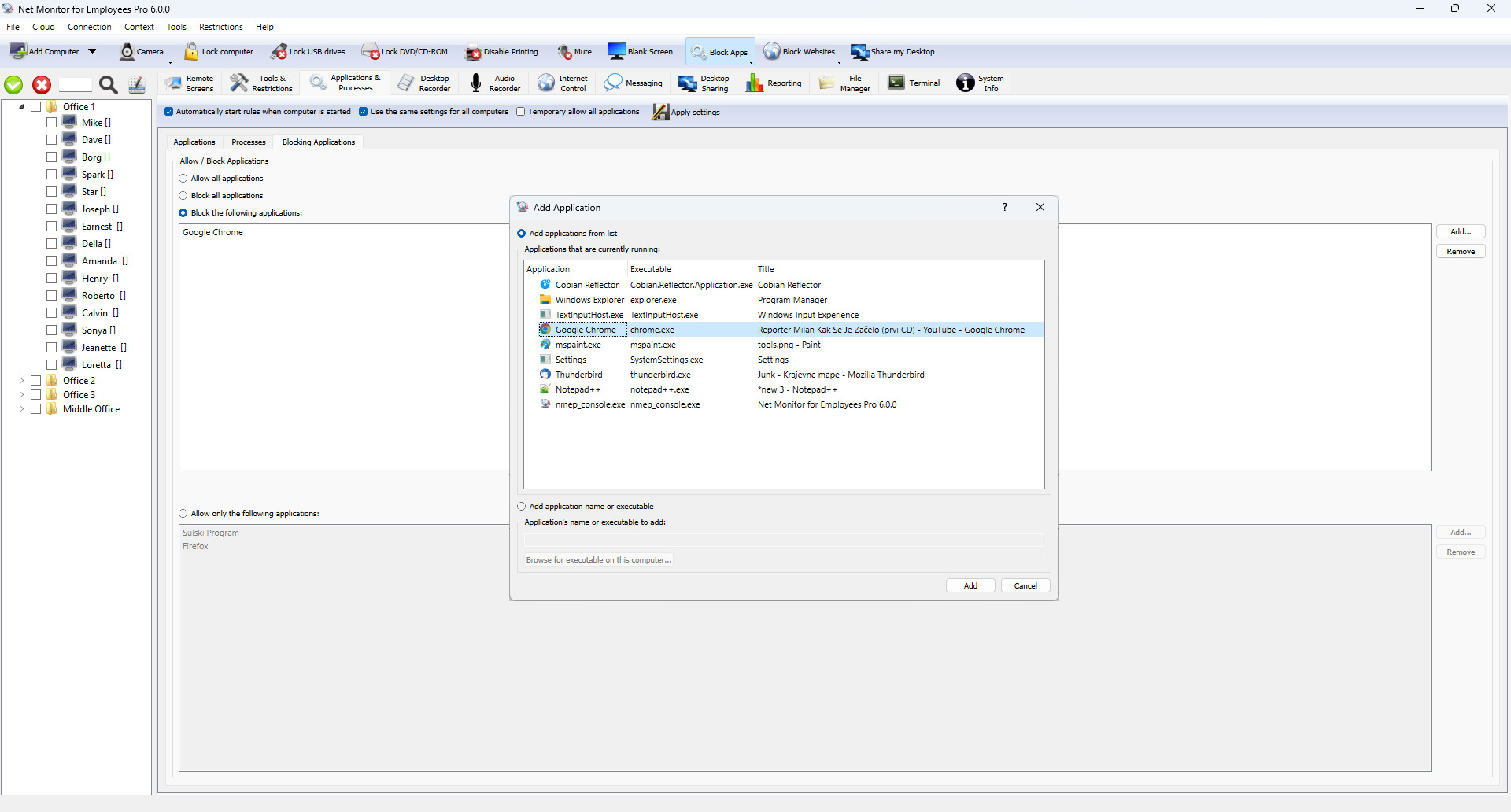 This picture shows how a team leader blocks some applications to reduce distractions at work.
If you want to do the same, you can download this application here.
Identify and Recognize Best Performers at Work
Surveillance does not only help you identify wrongdoing employees but also the best performers at work.
With good software, you will know how many hours employees are working, how much time they spend to better their skills, and even their efforts to take your business to a whole new level.
As the manager or owner, you will have a chance to know overworking and most productive team members and identify those who complete tasks on time and working hard to help your organization grow.
It's essential to give your team a clear message that you are looking for disciplined and best-performing employees at work, and the employee monitoring software is a tool that helps you to identify them quickly.
When you identify them, you should recognize their achievements during the meeting and reward them with awards or promotions. Such an approach will bring a positive culture, and it will improve morale and motivation at work, enhancing your team's productivity.
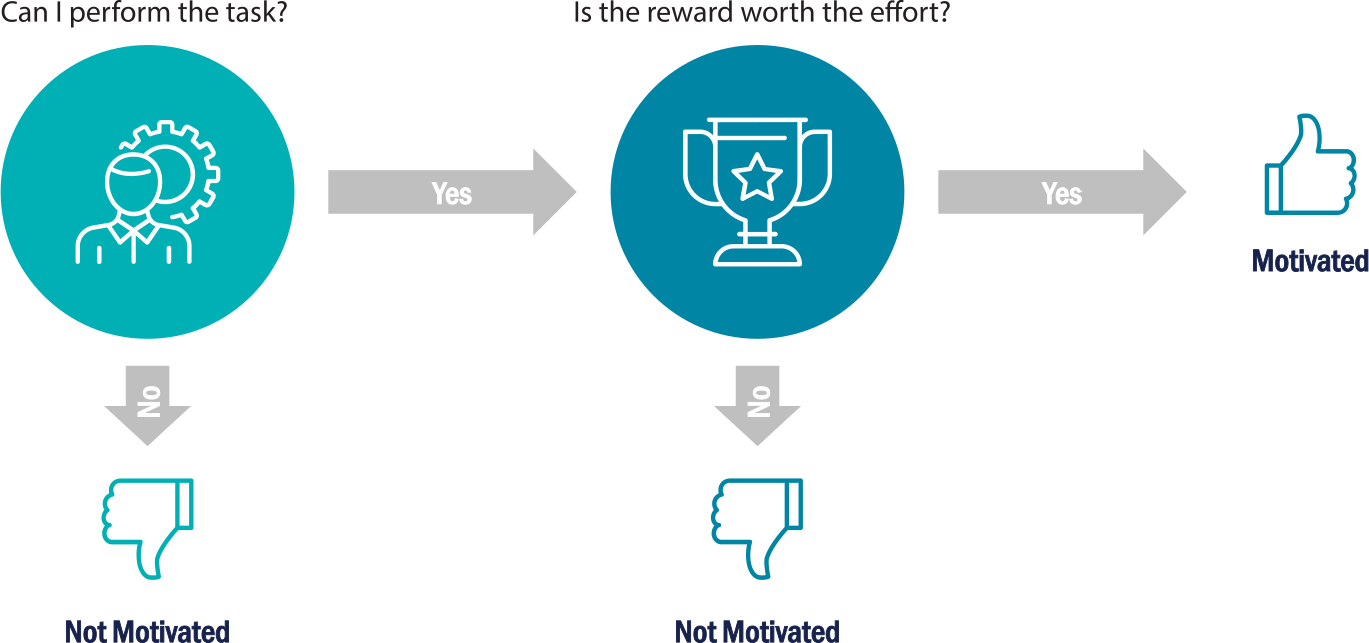
Identify Non-Performing Team Members and Support Them
You may not have a team of high performers only. Some members of your group may be slow, and some tasks can be more demanding for them.
By using the employee surveillance application, you can know if an employee is struggling with some tasks or not. Some may try to search for information online, and you can check the websites they visit.
You can quickly identify struggling members of your team and support them. That way, you will improve their productivity.
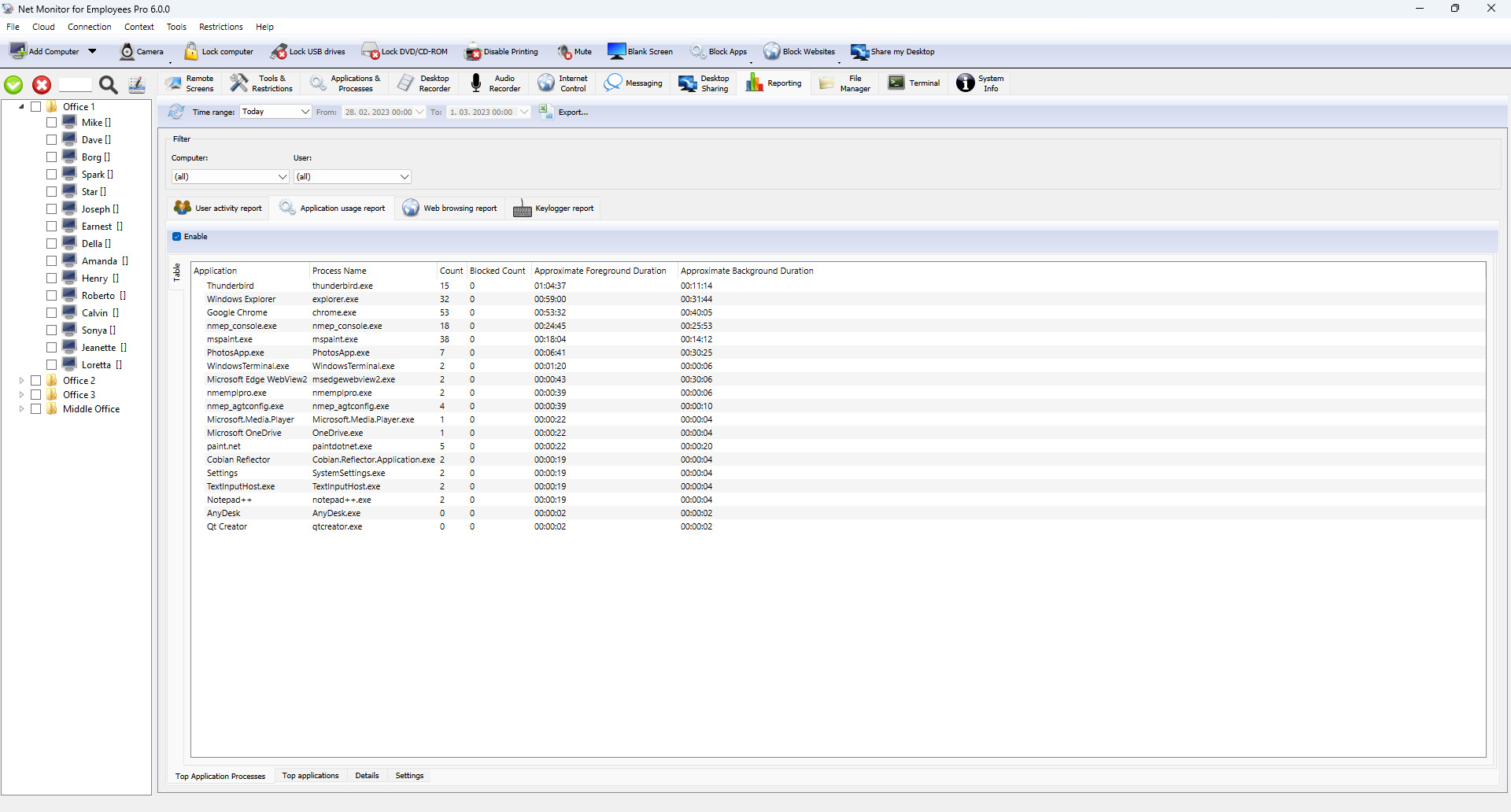 In this picture, you can see how the manager investigates which websites the worker has visited.
Click here to buy the same application.
To Gather Evidence for Fraud or Any Other Criminal Activity
Employee activity monitoring involves checking what team members do on their computers, apps they use, websites they visit, emails they send or receive, files they copy and share, among other things.
All this information is recorded and stored in an online account or server. If there is fraud or any other criminal activity in the organization, you can just check the information, and you will get evidence of how and who committed the crimes.
To Identify Mistakes That Can Cost You Money
Surveilling your staff computers can help you see the mistakes of employees while working.
Real-time monitoring enables you to identify mistakes instantly, so you can contact workers immediately and request to correct the errors so that you can avoid costly mistakes.
In addition to that, you can use an employee monitoring system to gather evidence. If an employee has been untrustworthy, you can use the system to collect the evidence to show him or her why you need to take action.
To Protect Your Business Data and Prevent Corporate Sabotage
In today's technological world, data is a vital part of any organization. With a sophisticated computer monitoring application, you can know the websites and apps employees visit and use.
You can block malicious sites and apps that can be a threat to your business data. In addition to that, you can quickly identify which employees are providing your business secrets to your competitors.
Some of your team members may be giving out your business secrets, such as financial records or plans, to your competitors. They can do so by sending emails, making calls, sending messages, or other means.
Besides that, your employees can visit funny sites or click malicious links that can put your business data at risk.
With a sophisticated monitoring system, you can identify employees who share your business secrets or threaten your data's security. That way, you can take the appropriate action.
Help Identify Team Members Leaking Information to Competitors
An employee leaking financial records, business plans, and other secrets of your organization to competitors is not worth keeping. Leaking of your secrets limits your organization's growth and can even bring more complex financial challenges.
With computer monitoring, you will monitor all employees' activities on company computers. This way, you will quickly identify those with no good intentions. With an employee monitoring application, you will locate traitors and then take the necessary action against them.
Enable Flexible Working Environment
You can allow team members to work from home or any other location because you can monitor them remotely. Real-time remote monitoring can help save commuter hours and expenses. Your workers will perform better, knowing you are supervising them.
Real-time remote monitoring can be handy when work from home is required because of some external cause like extreme weather conditions, COVID-19 epidemy...
Uncover Weaknesses in Your Organization
If you want to uncover weaknesses among team members or business processes, you should track their activities.
With activity tracking tools, you can quickly identify struggling employees who can make costly mistakes. Also, you can identify weaknesses in processes that cause time wastage and extensive resource utilization.
Identifying and tracking all these flaws through simple application can help you improve your business.


Start Employee & Computer Monitoring NowDownload a free fully functional trial version
Remote Real-Time Surveillance
Monitoring employees can be difficult if they are working outside of the main office building. Such work usually happens when your workers are working at the customer, on the field, or just working from home.
Sometimes your employees will need to work from home due to some unpredicted events like extreme weather or special medical conditions (the COVID-19 epidemy forced many workers to work from home to prevent disease spreading).
To perform remote real-time monitoring, you should use computer monitoring software that allows employee monitoring over the Internet.
The Net Monitor for Employees can do such real-time surveillance by using a Cloud connection.
Worktime Tracking / Worker Idle and Active Time Reporting
An employee can be physically present in the office but not working. With computer monitoring software, you will be able to know details of all logins and logouts, active/idle times, first and last activity, among other things. You will know if an employee is working or is just present in the office.
You need to track your employees' productive work hours and take action to improve your work process. Detailed reports will tell you where and how your workers are spending time during working hours.
Reporting data will help you analyze the time spent on projects, which allows you to optimize your work process.
You will see which workers are most effective and why.
Such work time reporting tool provides reports like:
- Active / Idle Time Report
- User Logon / Logoff Report
- Detailed User Activity Report
- Work Time Report
- ...
If a worker's salary depends on effectiveness, this tool will give you a proof of that.
Which Employee Activity You can Monitor?
You may think that employee monitoring is something recent from the IT era, but nothing could be far from the truth. It was invented at the end of the 19th century in the form of timesheets where worker attendance was tracked.
In modern times employee activity is tracked by using advanced monitoring software.
The employee activity surveillance application is a tool for increasing productivity by measuring individual, team, and organizational productivity. Users can also track their time spent on tasks and projects.
A sophisticated employee computer monitoring software can track almost all employee activity in real-time, like:
- Live computer screens (screenshot capturing)
- Running applications and processes
- Visited web sites
- Keystrokes typed
- ...
Additionally, such computer surveillance software provides historical data that you can use for behavior analysis.
Modern applications can do much more than just tracking the worker's activity. Administrators can also use computer monitoring software for maintaining and supervising computers connected to a company network.
Applications like Net Monitor for Employees Pro provide many features that can simplify your employee monitoring and computer management.
Is Employee Monitoring Something I should do?
Should employers monitor employees? This is one of the big questions asked around, and a simple answer is yes. You need to monitor employee activities while at work and even when working from home.
The only problem is how you do it. You don't have to move around offices all the time; you just want to have a smart employee activity monitoring software. The application will do all the work, and you will receive all the information on a private server or online account.
The globalization and competitive world is forcing us to act quickly to stay ahead of the competition. For this reason, many managers are seeking tools that will help them with this mission.
The employee computer monitoring applications are just some of those tools that can help you. And yes, your competitors are probably already performing employee computer monitoring in their companies to improve productivity and try to step ahead of you.
Now is your time to decide if computer monitoring is right for you. To answer this question, you need to ask yourself what surveillance software can do for your team.
If you want to monitor almost 100% of employee activity, then employee computer monitoring software provides just what you want.
Maybe you want to prevent harmful activities like installing dangerous applications or surfing forbidden websites. In such a case, the application can limit employee activity.
If you want to investigate productivity issues or performance bottlenecks, the employee computer monitoring software provides data that you can use for such analysis.
As you can see, computer-supported employee surveillance is a useful method that can help you supervise your office activity.

Introducing Employee Monitoring Software to Your Team
As a manager, employer, or team leader, you probably see no obstacles to run employee monitoring software in your office since it is your decision to installing it or not. Anyway, it is an excellent practice to get your team informed and involved before starting with computer monitoring and performance tracking.
Researches show that when activity and performance tracking directly links to rewards, such tracking brings many positive effects regarding staff performance.
Talk with your team about the benefits that computer surveillance brings to them.
What Are the Benefits for the Team?
As the owner, boss, or team leader, you already have a clear idea of how the activity tracking and screen capturing software gives you insight into your staff performance and activity. Still, many team members may not see any benefits at all - they will probably see only drawbacks that employee computer monitoring brings to their life. For this reason, you must show them the benefits.
Here are just some of the benefits you may want to point out:
- Possibility to work from home is those days an attractive option for many staff members
- Additional rewards for hard-working team members, thanks to better and more accurate reporting
- More proofs that can be groud for promoting team individuals
- Better collaboration with other workers
- ...
As you can see, employee monitoring software can bring benefits for all when using a positive approach.
Ready to Protect your Bussiness?Download a fully functional trial version now.
How to Do Employee Monitoring the Smart Way
Here are 5 Tips for You!
Employee monitoring is a good thing, but you must do it the right way. Learn how to do employee monitoring the smart way here.
Employee monitoring helps you improve productivity and easily identify employees sharing your business information such as plans, financial records, or any other thing with your competitors.
However, you need to do employee monitoring in the right way for you to enjoy all the benefits. You can't just walk from one office to another or have spies in every department to spy on them.
To help you monitor your employees the smart way, we are giving you those five tips.
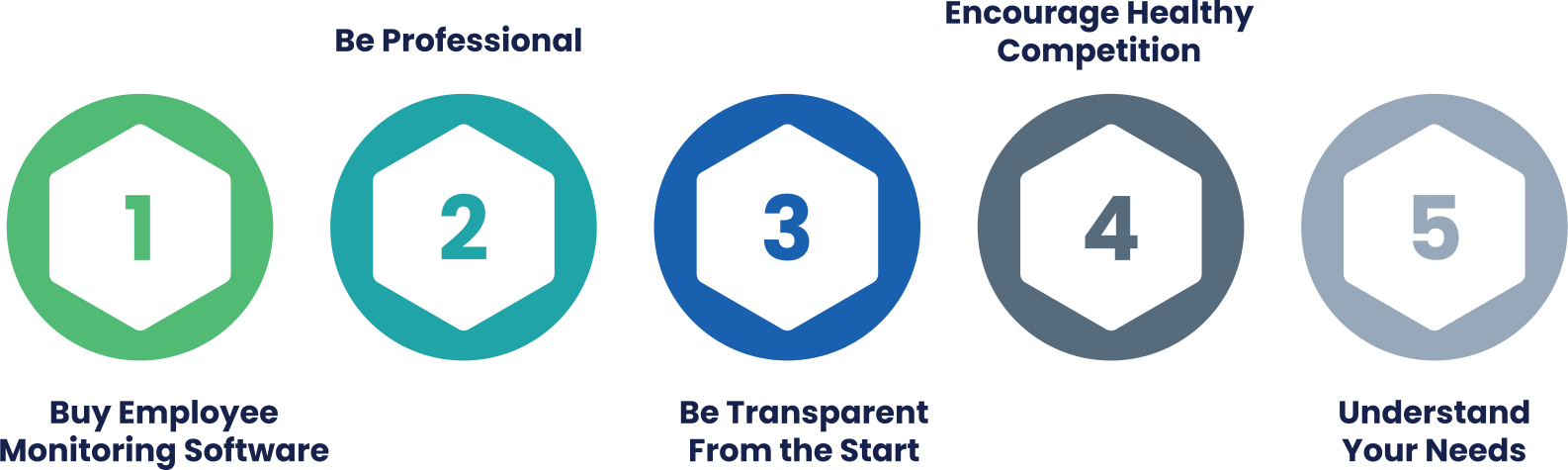
1. Tip: Get an Advanced Employee Monitoring Software
In today's digital world, you want to adopt new ways of doing things. You can now get an employee monitoring software to monitor almost everything employees do while at work.
Best surveillance tools have features that can send you a screenshot of all employees' computer monitors. Besides, you can monitor the webpages employee visit. You can also monitor emails and live chats, among other activities.
As you can see, using advanced monitoring software is a smart way of keeping an eye on your employees while at work.
2. Tip: Be Professional
Although the purpose of employee surveillance is to monitor employees while at work, you will find that some employers do monitor their employees even when they are off duty.
When doing so, team leaders may see the personal information or issues of employees without their will.
If you track your workers even when off work, they can feel uncomfortable and even quit the job. For that reason, you should be professional and focus on only work-related issues such as email monitoring, computer monitoring, and more while at work.
Don't make the employees uncomfortable - the main aim of surveillance is to make your staff more productive.
3. Tip: Be Transparent From the Start
If you want employee monitoring to benefit you and the employees themselves, you need to be transparent from the start.
If you want to install an employee monitoring application, you need to tell your staff about it and explain its aim.
Ensure that all employees know about the monitoring, and they will work even harder to ensure they deliver. No employee will want to be on the wrong side, and that will definitely improve employee efficiency. If the application doesn't invade their privacy or personal life, they will be comfortable with it.
Full transparency ensures that all team members understand the purpose of why you use the application and what you want to achieve.
However, if you want to investigate some employees, you can keep it a secret until you gather enough evidence.
Many employers put the system in place without informing the employees - mostly when they are investigating something. If you want to improve productivity, tell them once you have the system in place.
4. Tip: Encourage Healthy Competition
Some employees don't work to their level best because of their bad habits, such as intensive social media use, online games, gambling, and other illegal activities.
When you block some of the applications and limit internet access, these employees can be more productive.
When you identify the best employees through employee monitoring and recognize and award them, other team members will work hard to ensure they will be recognized and awarded next time.
Such rewards bring healthy competition and positive culture that help them develop and become more productive.
5. Tip: Understand Your Needs
Businesses have different employee monitoring needs. A business owner or manager may want to monitor staff to reduce time wastage. Another may want to limit the websites employees visit, while another manager wants to investigate fraud at the company.
Therefore, know your needs, and get an application ideal for your company conditions. In short, let your needs determine the monitoring software or system you are going to use.
Proudly protecting Businesses of all sizes in more than 160 Countries
6 Steps on How to Choose the Best Employee Monitoring Software
If you want to monitor your employees effectively, you need to choose the best software for the job. Remember, you want an application that can bring benefits to your organization. Therefore, you must take your time when searching.
Buying a computer monitoring software is not an easy task. There are many applications on the market, and it may not be so obvious to pick the most appropriate one for your organization.
You are aware that the chosen application will help you monitor your employees remotely, so you want something reliable that won't put your business data at risk. Also, you need to take care that the application you choose will be compatible with existing systems to avoid additional costs of installing and running your monitoring system.
Different companies have different requirements. Although an incredible number of monitoring software solutions available on the market, it may still be challenging to choose the right one for your organization.
You are reading these tips because you want your business to grow. For this reason, you need to choose the application that can support your growth in the future.
Even if you currently use, e.g., only Windows computers, make sure that the chosen employee monitoring software also runs on other operating systems like macOS, Linux..., since your growth may lead you to use those systems too. If you want to monitor your employees using a smartphone, check that a proper mobile app for your mobile device (iOS, Android) is available.
It's essential to monitor your employees when at work or even on official duties on the field. Remote real-time monitoring helps you know if workers are working as expected and can help improve your organization's productivity.
You can't have your eyes in every department, on every employee, at the same time. But with the best monitoring software, you can easily monitor your employees without leaving your desk or even when you are out of the office. To help you choose a suitable employee monitoring software, here are useful steps for you.
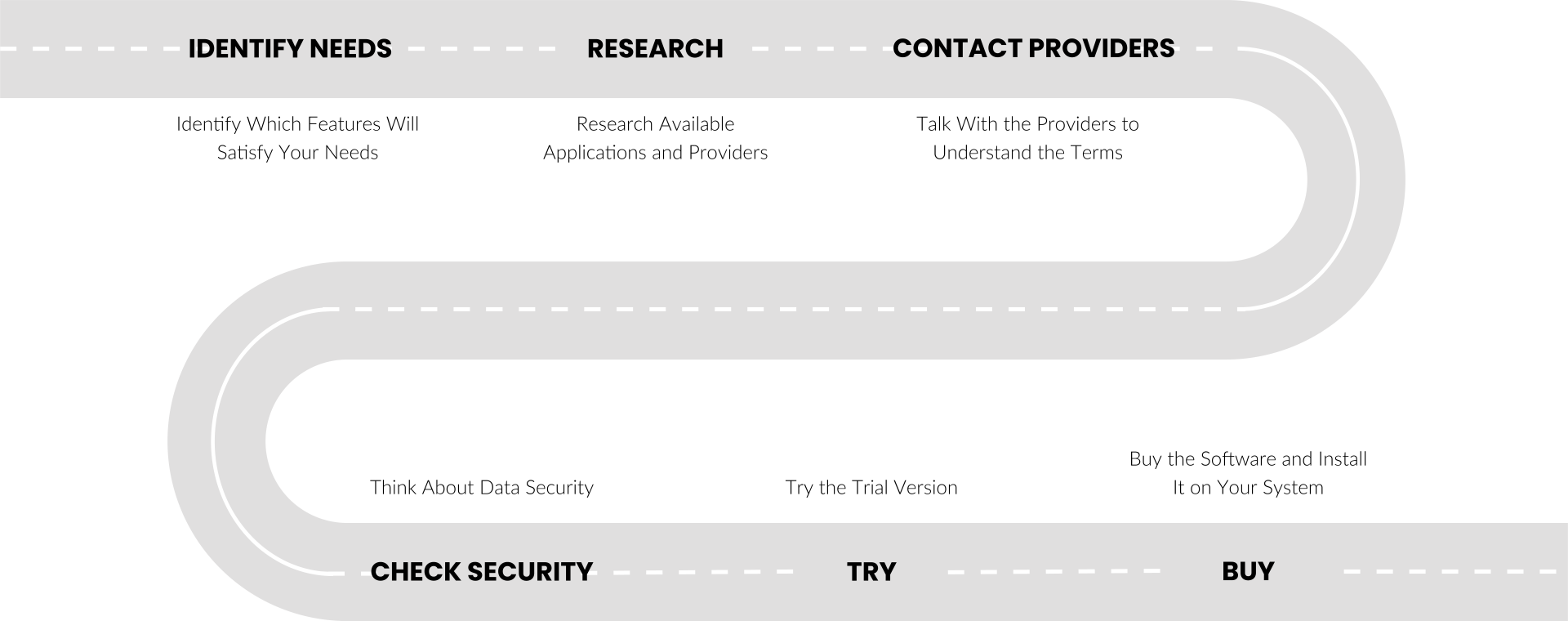
Step 1: Identify Which Features Will Satisfy Your Needs
You need to identify your needs - why do you need this system? It would help if you also asked yourself several other questions like:
- How many computers do you want to monitor?
- Are computers in one building?
- Do I need real-time monitoring or just reporting?
- Do I need to block certain activities like application use and web browsing?
- Do I need to monitor activity when employees are working from home?
- ...
All these answers will help you know which features you need and how much you will spend on the application.
You need to go for software that will address all your monitoring needs. That means the software must be rich in features, ensuring you can monitor almost everything done by employees.
If you want to monitor webpages employees visit, you need to go for software with a webpage monitoring feature.
Software with application monitoring, email monitoring, live chat monitoring, keystroke logging, screenshot capturing, removable device monitoring, and reporting features are ideal applications. Such an application will address all your employee monitoring concerns.
Step 2: Research Available Applications and Providers
By having an idea of what you want, you can now go to the market. Before you settle on any software, you need to do some research.
You want to check some of the top-rated applications, get to know how they work, how many computers they can monitor, and which features they have.
Also, don't forget to read their reviews. It is always advisable to consider software with genuine positive reviews. Application with negative reviews from past customers is not suitable for you. When you do all that, you will identify two or three applications that you can consider. You may even ask a provider to give you some existing customer references in your local area.
After narrowing down the list of candidates, you need to find out how each application works, what organizations that are using the software are saying.
Researching will help you choose the most appropriate software for your organization. If possible, try the trial versions, and you will know if a software is right for you or not. As you may want more information or help with the software, don't forget to find out if the provider is responsive, helpful, and honest.
Some employee monitoring applications are suitable, but their providers are becoming unresponsive just after buying the software. For this reason, you want to choose a provider with a good reputation.
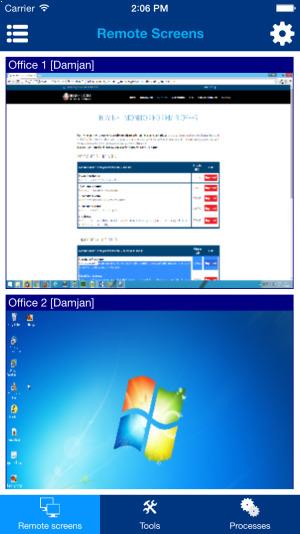
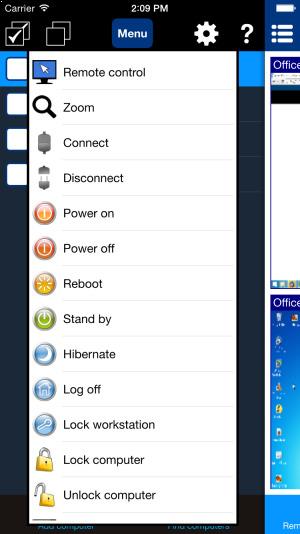
If you want to do the same, then you can get this application here.
Step 3: Talk With the Providers to Understand the Terms
After identifying two or three applications you can buy, it's advisable to talk with the providers. Ask the providers to explain the fine details of the software, including costs.
From these discussions, you will differentiate a reliable provider from those who are just after the money. Remember to ask about the terms of payment or whether you need to renew the license after some time.
If you want to have reliable software for employee monitoring, you need to get ready to pay a small fee. Some free or cheap versions are not that good because they don't have advanced monitoring features.
Many applications out there can not even handle the surveilling of large teams. However, you can find affordable software to monitor all your employees. Make a price comparison, consider the features and ease of use, and choose the application worth the money.
The Net Monitor for Employees Pro is a sophisticated employee monitoring application for an affordable price. You can check the price here.
Step 4: Think About Data Security
Data security is one of the most important concepts you need to take care of while running a business. If your employees do whatever they want on the computers while at work, they can put your business data at risk.
You can find that some of them have installed malicious apps on their computers or are visiting risky sites that can compromise your data security. By monitoring what they do on the computers, you can know which employees are putting your data at risk. You can even block applications and websites and also control running applications and processes.
That way, your data will be secure, although you need to use a secure data storage system for guaranteed data security.
Ensure that the application you choose allows protecting your data and, at the same time, does not put your company data or employee data at risk.
In today's digital world, data security is critical in your business, and you want an application that guarantees privacy and security of the data. If you go for unproven software, your company data may get stolen, which can be a massive risk to your business.
Step 5: Try the Trial Version
Most genuine providers of computer monitoring software have a trial version. You just need to try this free trial version and know if it will help you or not. It's also important to understand that most trial versions come with limited features and may not effectively show a clear picture of the real software.
Check that the trial period is long enough that you can thoroughly test the application. Avoid providers that want payment for a trial version. Learn with the software, and if it addresses your monitoring needs, you can buy it.
If you want to try one of the best employee monitoring applications on the market, you can freely download it here.
Step 6: Buy the Software and Install It on Your System
After using the trial version and confirming the software is right for your organization, you can close the deal. You should pay with the safest payment method and install the software on your computers.
Usually, you will need to install some monitoring agents on employee computers and admin applications on your computer and the computers of your team leaders, which are allowed to monitor employees.
Proper software solution monitors employee desktop activities in both transparent and secret mode.
You can set triggers to block access to banned websites, files, and applications so employees can focus on their tasks without distraction.
A good monitoring application not only focuses on tracking the computer activities of your employees to optimize productivity but also eliminates malicious threats to your company's security.
Overall, entrepreneurs and managers can use monitoring software to understand better how their employees spend time at work and how they work.
Net Monitor for Employees Pro is employee monitoring software that provides you with real-time information about what your employees are doing during their working hours. You can also track all team members' computer activities and take periodic screenshots to show what each employee is doing on the computer. It allows you to monitor employees remotely as well as employees in the office.
Conclusion
As you can see, the employee monitoring software is an essential tool that helps managers and team leaders make better decisions.
Remember that you must have good software for employee monitoring for the best results. Net Monitor for Employees Pro is one of the best options and will not only help you keep an eye on your employees but also improve employee efficiency and productivity.
The software comes with a lot of features, is affordable and easy to use. At the same time, it will also allow you to protect your organization from fraudulent activities.
Recommended Setup and Feature Guides
Use these internal guides to go deeper into installation, live monitoring, remote work supervision, activity logging, and administrative control.
Deployment Guides
Install the monitoring console, configure LAN, WLAN, and VPN monitoring, or set up remote employee monitoring over the Internet.
Monitoring Features
Learn how to use employee screen monitoring, computer screen recording, activity reports, and the employee keystroke logger.
Control and Security
See how to enforce Internet blocking, apply application restrictions, use remote desktop control, and browse feature screenshots.
Ready to start monitoring your employees?
Buy this application now. You will never regret your decision.
Buy Now